
Description
This article explains how to retrieve and show the actual system name and/or the configured hostname/IP address of a system being monitored remotely, while using an alert action (e.g. ‘Trigger a PATROL Event’).
Solution
Use the %{HOSTNAME} macro to retrieve and show the system name (also used as the internal system ID).
Use the %{/../../MS_HW_MAIN/%{HOSTNAME}/hostname} macro to retrieve and show the hostname/IP address of the monitoring system.
The procedure below explains how to use these macros to customize the “PATROL Event” Alert Action.
- In the PATROL console, right-click the Hardware icon of the remote system for which you need to retrieve information, then click KM Commands > KM Settings > Alert Actions…
- Select the Trigger a PATROL Event and the Annotate the parameter’s graph check-boxes and click Next to continue.
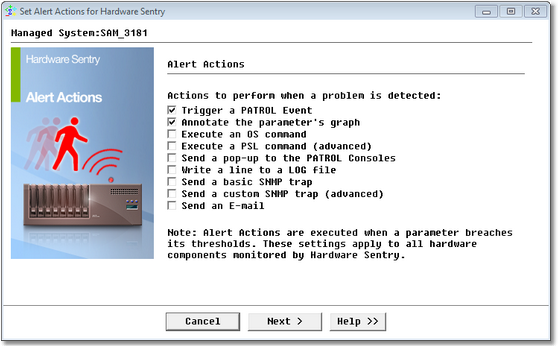
Note: the Annotate the parameter’s graph is optional and is only mentioned here to help you easily identify when the threshold breach occurs. - Copy the following text in the dialog box:
Hardware problem on %{HOSTNAME} (%{/../../MS_HW_MAIN/%{HOSTNAME}/hostname}) with %{OBJECT_LABEL}. %{PROBLEM}%{NEWLINE}%{NEWLINE}%{FULLREPORT}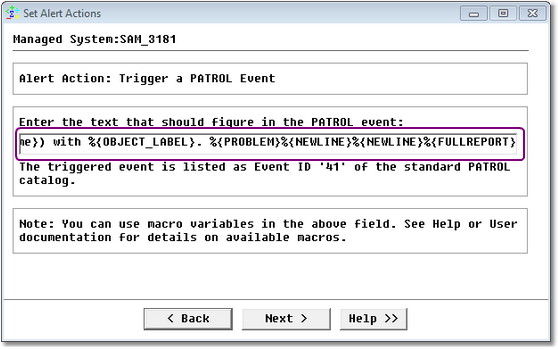
- Click Next twice and then click Finish to save your changes.
- Open the Event Manager and double-click the first event that occurred after you set the Alert Action.
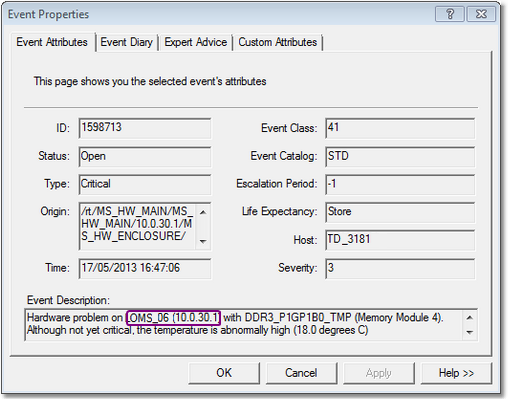
- The Event Description shows the system name and the IP address of the remote system as it was initially entered when you added the remote system to your monitored environment.
Note: The example above can be customized at wish to expose any combination of text with the system name (with the %{HOSTNAME} macro) and the configured hostname/IP address (with the %{/../../MS_HW_MAIN/%{HOSTNAME}/hostname} macro).
Related Topics
- Using Macros to Customize PATROL Event Alert Actions
- Monitoring Studio: Acknowledging Alerts Using Alert Action
- Hardware Monitoring: Errors Triggering Alerts on the ErrorCount Parameter for Physical Disks on Sun Solaris Systems
- Monitoring Studio: Getting Automatically Notified by Email for an Error in a Log File